Designing Melee Depth Around One Button
One attack button, two ways of reading input and carefully placed branch windows. It's easy to use, but good timing opens up different combat tools.
The idea started while I was working on the Outriders sequel. A planned melee system kept shrinking until it became an activated skill, much like the abilities in the original games, rather than a full melee system.
That left me with a question: could melee still have real depth without needing the usual light and heavy attack buttons?
The question became a practical problem on Starblade, a cancelled Northline Works action-adventure project. Its controls already needed to support jumping, dodging, blocking, traversal, sprinting, crouching, equipment abilities, aiming, shooting and ranged attacks. There was no comfortable place to add several dedicated melee controls without pushing out something the rest of the game needed.
A normal one-button combo would fit the controls, but repeating the same three attacks would get boring fast. Making the sequence longer would add more animation without giving the player more control. The system had to be easy to pick up, but still give the player real choices and room to unlock more later.
The answer was to make timing part of what the button means.
Two buffers, two different jobs
The system starts with a simple three-hit combo, but reads input in two different ways. One keeps the current combo going. The other lets the player move into a different branch.
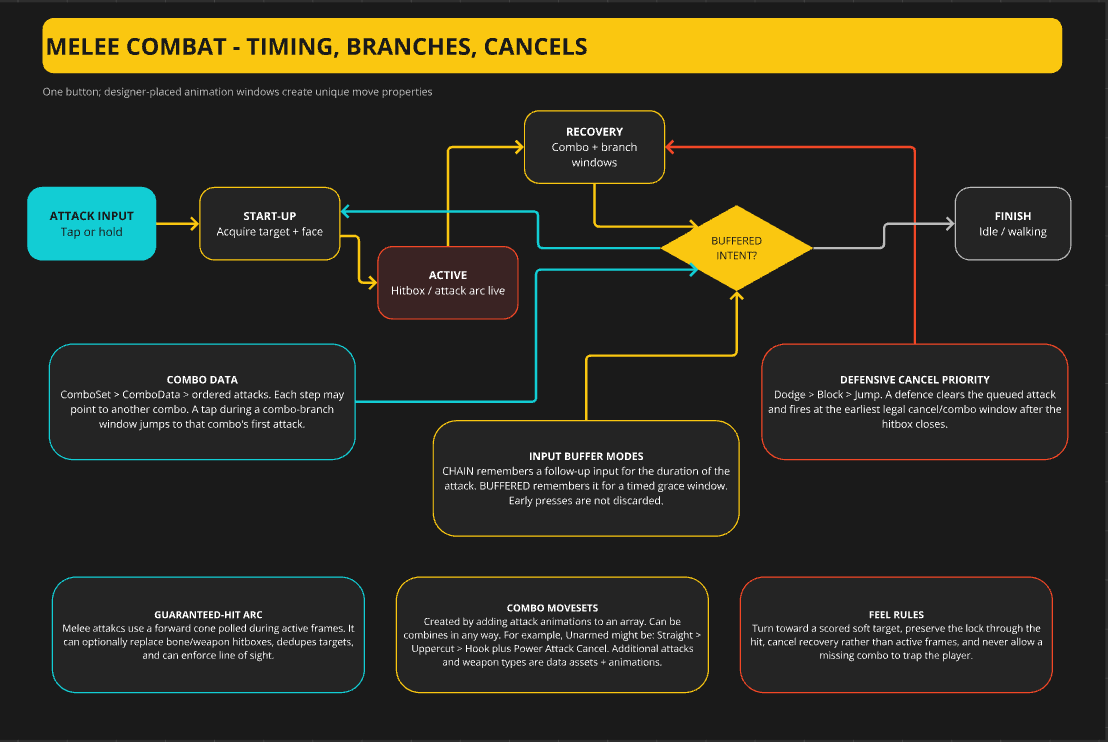
CHAIN remembers a follow-up input for the entire duration of the current attack. The player can press early or repeatedly and the next attack in the active combo will still come out. So mashing the button gives a reliable base sequence rather than dropped inputs or weird surprises.
Combo branches use BUFFERED instead. It holds an input for only 0.2 seconds, with branch windows placed at specific points in the attack animations. To change route, the player has to press close to an active branch window. Press too early and the input expires, so the player stays on the current combo.
Keeping the combo going is forgiving. Changing what the next attack does takes timing.
Branches with a purpose
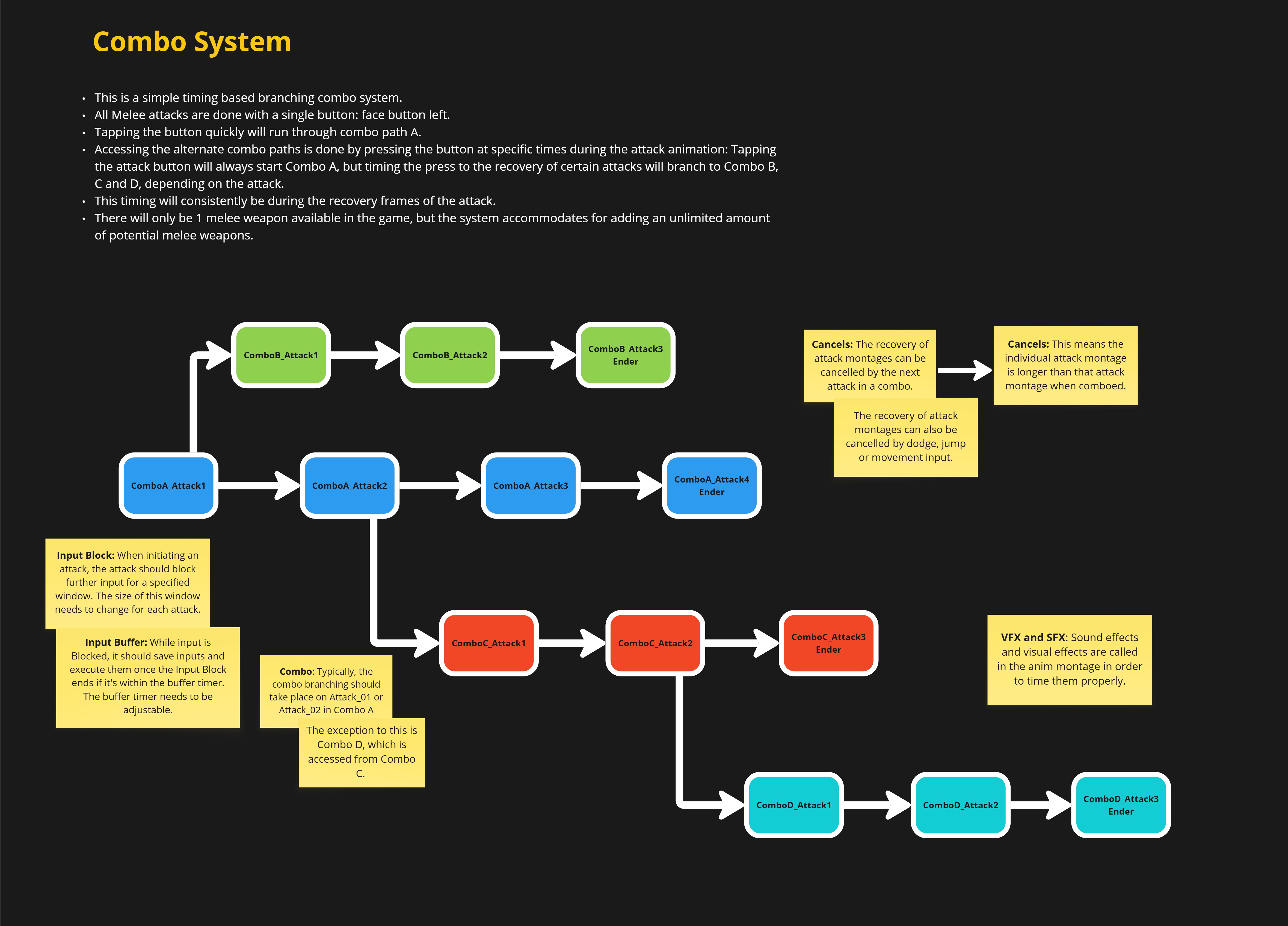
A branch near the end of the first attack leads into a hard-hitting single-target combo. Its finisher knocks back smaller enemies, breaks blocks and stuns larger enemies. It's the only melee route that does those things, giving the player a specific answer to blockers and bigger threats.
Another branch appears during the recovery of the second attack in the base sequence. Taking it starts a new three-hit sweeping combo, stretching the full sequence to five attacks and giving area coverage against groups of lesser enemies.
So the same button can do several different jobs:
- Keep the normal rhythm for a reliable all-purpose combo.
- Time the first branch for single-target pressure, block breaking and stun.
- Time the second branch for sweeping attacks and crowd control.
The branches aren't just different animations. Each one solves a different problem, which changes when and why the player picks it.
Commit to the hit, not the whole recovery
Longer combo routes also change when the player can defend.
An attack can't be cancelled while its hitbox is active, but Dodge, Block or Jump can cancel the recovery. Choosing one clears the queued attack and triggers the defence as soon as the hitbox closes.
Dodge > Block > Jump
That stops players cancelling an attack before the hit means anything, but doesn't leave them stuck through the whole recovery. Targeting holds through the hit, then the player can turn toward the best target during recovery. Missing never leaves them locked onto empty space.
Letting the combo tree grow
Each combo is an ordered set of attacks. Any attack can continue to the next step or use a placed branch window to jump to the first attack in another combo.
Those new combos can have branches of their own. The tree can keep growing without needing more buttons, and progression can add new routes to attacks the player already understands. Unlocking a move adds another choice, not another command to memorise.
There's no hard limit on how deep the tree can branch. The real limits are readability, animation cost, progression pacing and how many genuinely different combat jobs the game can support. The goal isn't to build the longest possible combo. Every branch must give the player a reason to choose it.
A new player can press one button and consistently perform a complete melee sequence. A more experienced player can recognise the animations, control their timing and route that same input toward crowd control, block breaking, knockback or stun.
You get a melee system with its own useful choices, progression and room for skill, without taking another button on the controller.